Sisvar (for older operating systems)

Description
Sisvar is a statistical analysis and experimental design software. Its first version was released in 1996 for the DOS operating system. Its original programming language was Pascal, compiled using Borland’s Turbo Pascal 5.5.
Subsequently, with the advent of Delphi, Sisvar was converted for Windows. Its first Windows version was compiled in Delphi 1.0 using Object-Oriented Pascal. Since then, Sisvar has been continuously updated and is currently compiled in Delphi 7.0.
Some basic specifications of the software:
- Version: 5.8
- Build: 92
- Language: Object-Oriented Pascal
- Financial Support: CNPq (Research Productivity Grant)
- Operating System: Windows (runs on Linux via Wine / Windows Emulator)
- Registration: 04/28/2006 under registration number: 828459851
- Sisvar is free software (Free)
- Note: If your Help file does not launch, please reinstall your version. Date: 07/28/2015
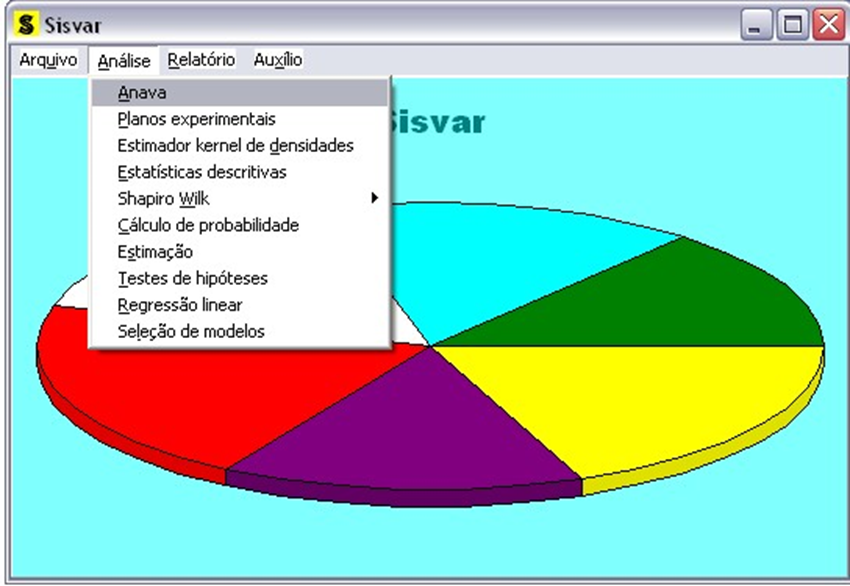
In summary, Sisvar performs the following main analyses:
- Analysis of Variance (ANOVA): users can specify their ANOVA model according to their research needs. It allows models with up to 200 effects and 150 error terms (350 sources of variation in total). Some of these sources of variation can be intermediate error terms, such as in split-plot and split-block (strip-plot) designs. Sisvar performs multiple comparison tests for means, regression for quantitative sources of variation, contrasts, and much more. The slicing/unfolding of interactions is one of Sisvar’s greatest advantages.
- Experimental Designs: allows users to randomize experiments and generate design layouts for completely randomized designs (CRD), randomized complete block designs (RCBD), and partially balanced incomplete block designs (PBIB). Users can also choose various treatment structures, such as factorial and split-plot arrangements.
- Kernel Density Estimator.
- Descriptive Statistics: calculates measures of location, dispersion, and distribution shape. Provides histograms and the Shapiro-Wilk test of normality.
- Shapiro-Wilk Normality Test.
- Probability Calculations: calculates probability densities, quantiles, and cumulative probabilities for various continuous and discrete distributions, including non-central distributions.
- Estimation and Hypothesis Testing: performs point and interval estimation for parameters of interest from one and two populations (independent or paired samples). It also performs hypothesis testing for these scenarios.
- Simple and Multiple Linear Regression: Sisvar performs regression analysis within the ANOVA context, using pure error to compute standard errors and run hypothesis tests. Likewise, it allows regression analysis outside experimental setups (i.e., independent of experimental design structures). Users can construct custom terms using simple mathematical functions. Furthermore, Sisvar performs linear model selection using backward (my personal favorite), stepwise, and forward selection procedures.
- Multiple Comparisons via Bootstrap: a powerful feature that allows users to perform Dunnett, Tukey, and SNK tests using bootstrap resampling. In addition, Sisvar features a bootstrap version of the Scott-Knott test. These topics were the focus of my post-doctoral research supervised by Prof. Clarice Garcia Borges Demétrio and Prof. Bryan F.J. Manly, alongside my friend and colleague Amauri de Almeida Machado (author of Sanest, one of the leading statistical software programs historically used in Brazil).
Attention
- I strongly recommend upgrading to version 6.5 (or higher)
64-bit, which can be downloaded on this same site under theSisvar 6.5tab. Backward compatibility between old and new file formats is no longer supported, but the download page for the modernized 64-bit Sisvar includes instructions for easily converting old files into the new format.
Download
Download the latest version of Sisvar here: Download.
If you experience issues with downloading, click here.
IMPORTANT: Preferably install Sisvar as an administrator by right-clicking the setup file and choosing “Run as administrator.”
Note: Please note that the download link includes a web redirect address that allows me to keep track of download statistics.
A short Sisvar user manual: download
Instructions for saving as dBase (.dbf extension) in Excel 2003 or earlier: download
Currently, I strongly recommend using LibreOffice for these conversions. It is very simple: just create a spreadsheet with variable names in the first row and their values in the corresponding columns. Download LibreOffice.
To use combined variances in experiments involving more than one experimental error, refer to the notes from my time-yellowed notebook: download here.
Citations
Cite Sisvar as follows:
FERREIRA, Daniel Furtado. Technological Upgrade of Sisvar: 64-bit migration and Waller-Duncan multiple comparison test implementation. BRAZILIAN JOURNAL OF BIOMETRICS, [S.l.], v. 44, n. 4, e-441408, 2026. doi: https://doi.org/10.28951/bjb.v44i4.1408.
FERREIRA, Daniel Furtado. SISVAR: A COMPUTER ANALYSIS SYSTEM TO FIXED EFFECTS SPLIT PLOT TYPE DESIGNS. REVISTA BRASILEIRA DE BIOMETRIA, [S.l.], v. 37, n. 4, p. 529-535, dec. 2019. ISSN 1983-0823. Available at: <http://www.biometria.ufla.br/index.php/BBJ/article/view/450>. Date accessed: 10 feb. 2020. doi: https://doi.org/10.28951/rbb.v37i4.450.
FERREIRA, Daniel Furtado. Sisvar: a Guide for its Bootstrap procedures in multiple comparisons. Ciênc. agrotec. [online]. 2014, vol.38, n.2 [citado 2015-10-17], pp. 109-112 . Disponível em: ISSN 1413-7054. http://dx.doi.org/10.1590/S1413-70542014000200001.
Ferreira, Daniel Furtado. Sisvar: a computer statistical analysis system. Ciência e Agrotecnologia (UFLA), v. 35, n.6, p. 1039-1042, 2011.
Ferreira, Daniel Furtado. SISVAR: um programa para análises e ensino de estatística. Revista Symposium (Lavras), v. 6, p. 36-41, 2008.
Link: Symposium article
FERREIRA, D.F. Análises estatísticas por meio do Sisvar para Windows versão 4.0. In…45a Reunião Anual da Região Brasileira da Sociedade Internacional de Biometria. UFSCar, São Carlos, SP, Julho de 2000. p.255-258.
Remarks
I would appreciate it if any bugs or errors found are reported using the email address provided at the bottom of the home page. Feel free to reach out if you have any questions.